Your club data, in your AI.
Add DinkBrain to ChatGPT, Claude, Claude Code or Codex. Sign in once. Then ask about your members, courts and revenue in plain words.
https://dinkbrain.com/api/mcpYou need a DinkBrain sign-in for your club. New here? The trial is free for 7 days.
Connect your AI to your club data0:51
Add DinkBrain to ChatGPT, Claude, Claude Code or Codex. Then ask about your members, courts and revenue in plain words.
Read the transcript
You already ask an AI for help. Now ask it about your club. DinkBrain makes your club data an MCP server. ChatGPT, Claude, Claude Code and Codex can connect to it. Add one link to your AI app. Then sign in to DinkBrain. Choose read only, or read and draft. You do not need an API key. Ask about your members, courts and programs, in your own words. Your AI uses DinkBrain's tools, and answers with your numbers. It can draft a session for a quiet slot, or a note to fading players. Nothing changes without your approval. You can also run Dink on your own PC, with your own Claude Code or Codex plan. Bring your own AI to your club data. Connect it at dinkbrain.com/ai.
Three steps, about two minutes.
Paste the DinkBrain server address into your AI app, or run one command in your terminal.
Sign in on dinkbrain.com. Pick your club and the access: Read only, or Read and draft.
Ask about members, courts, revenue and programs. Your AI calls DinkBrain for the facts.
Connect the AI app you already use.
Each app opens a DinkBrain page once. There you allow the connection. You never paste a key, and nothing is installed on your computer for ChatGPT or Claude.
ChatGPT
Plus, Pro or Business- Open Settings, then Apps & Connectors.
- Turn on Developer mode. Click Create.
- Paste the server address. Choose OAuth.
- Sign in to DinkBrain and allow the connection.
https://dinkbrain.com/api/mcpClaude
claude.ai or Claude Desktop- Open Customize, then Connectors.
- Click Add custom connector.
- Paste the server address. Click Add, then Connect.
- Sign in to DinkBrain and allow the connection.
https://dinkbrain.com/api/mcpClaude Code
In your terminal- Run the command below.
- Type /mcp in Claude Code and choose dinkbrain.
- Sign in to DinkBrain in the browser that opens and allow the connection.
$ claude mcp add --transport http dinkbrain https://dinkbrain.com/api/mcpCodex
In your terminal- Run the first command to add DinkBrain.
- Run the second command to sign in.
- Allow the connection in the browser that opens.
$ codex mcp add dinkbrain --url https://dinkbrain.com/api/mcp$ codex mcp login dinkbrainAnother MCP app? Point it at the same address. It must support OAuth sign-in for remote MCP servers.
Read only, or read and draft.
You pick the level when you allow the connection. Drafts are suggestions. Your AI cannot send a message or change anything in CourtReserve.
| What your AI can do | Read only | Read and draft |
|---|---|---|
| Read members, courts, programs and research | ||
| Read revenue from your captured payments | ||
| Draft a session to fill a quiet slot | No | |
| Draft notes to fading players | No | |
| Send a message or change CourtReserve | Never | Never |
| See settings, billing or your team | Never | Never |
Twelve read tools. Real questions.
Your AI picks the right tool for each question. Each tool reads your club data or our research. Revenue answers need revenue access, which owners and admins have.
Players, active players, the date range and courts. Revenue too, when your access allows it.
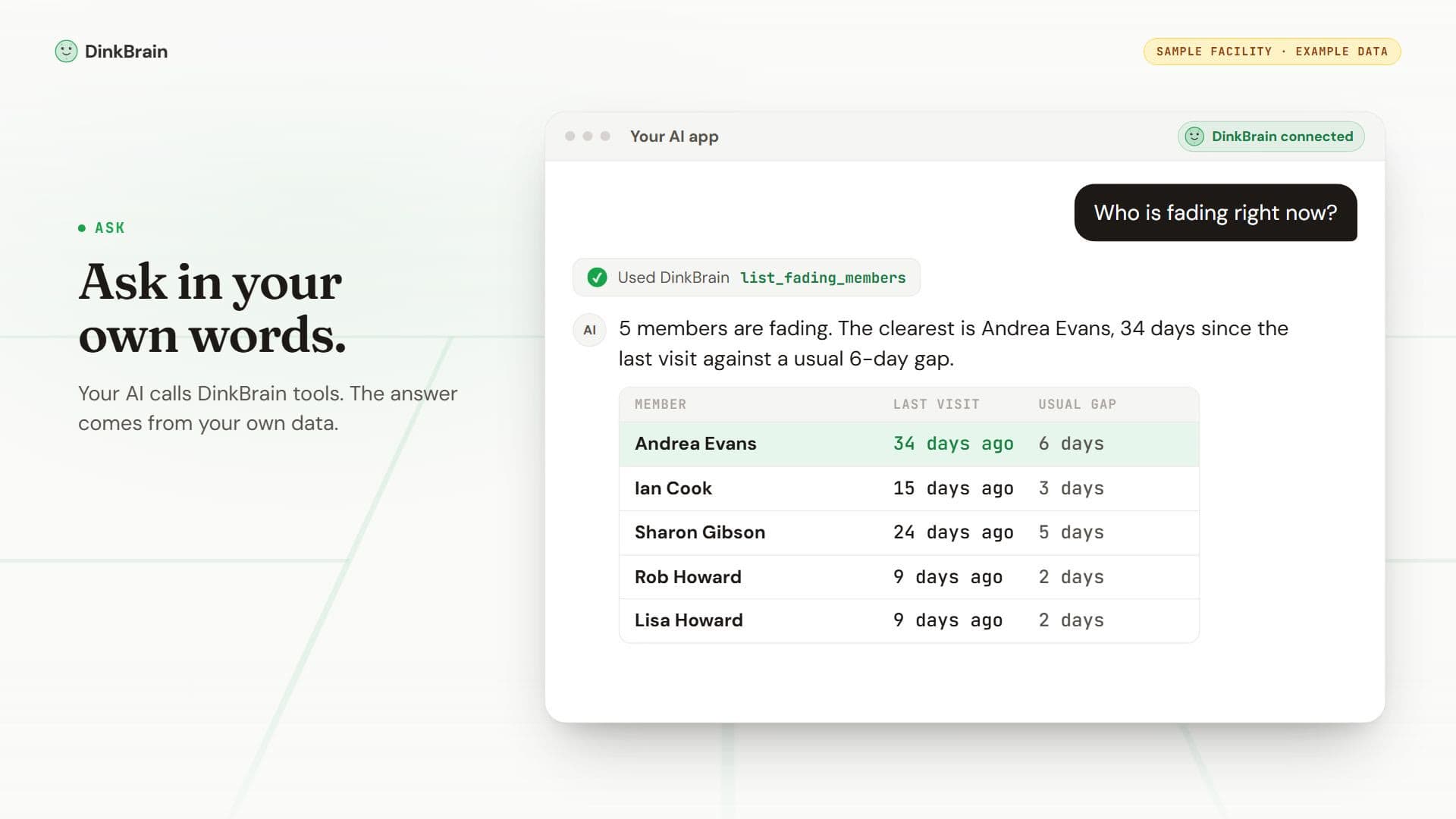
Players whose gap is at least twice their usual rhythm, ranked by how late they are.
A player search by name, with visit counts and days since the last visit.
Monthly revenue from your captured CourtReserve payments, and the change from month to month.
Court use by day and time, with the quietest and the busiest slots.
New players who stick, who stopped after a few visits, and who came only once.
An anonymous comparison with other DinkBrain clubs, when the group is large enough.
Your plan prices against real membership price ranges from clubs in our directory.
Industry research on formats, events, pricing, court layout and marketing, with sources.
The research topics and how many notes each one has.
DinkBrain's notes on club operations: retention, outreach, programs and more.
One knowledge note in full.
Your assigned company app, with source checks and import dates. Company finance access is required.
Your approved QuickBooks and Stripe sources, when the connection setup is complete.
Imported report and settlement records. The company owner must approve access.
Approved folders from your file connections, after setup and owner consent.
Find imported files by title within approved folders.
Read available file text with its source link, date, and coverage limits.
Draft tools (Read and draft only)
A suggested format and a list of players to invite. A draft only: it creates nothing.
Message drafts for you to read. Sending stays with you.
Run Dink on your PC with your own Claude Code or Codex plan.
In the app, the Dink Agent page takes requests like “Give me a weekly review of my club.” A small worker on your computer runs them through your own Claude Code or Codex sign-in. Your plan pays, and there is no daily cap from us.
- Uses your own Claude Code or Codex sign-in. No API key.
- The worker key can read and draft. It can never commit an action.
- Without the worker, Dink runs a few hosted requests each day for you.
- Stop it at any time: close the window, or revoke the key in the app.
The setup steps are on the Dink Agent page in the app, after you sign in.
Your data stays under your control.
The connection uses OAuth 2.1 with PKCE. Your AI app never sees your DinkBrain password.
Each access token lasts 24 hours. The app renews it while the connection stays on.
A connector can hold, at most, read and draft access. It cannot touch settings, billing or your team.
Each call checks your access again. If you lose access to the club, the connection stops at once.
The answers go to your AI app, so its own privacy terms also apply to them.
We do not ask for your Anthropic or OpenAI key. Your AI app's own plan pays for the AI.
Questions about AI and your data
What is MCP?
MCP (Model Context Protocol) is an open standard that connects AI apps to tools and data. DinkBrain runs an MCP server for your club.
Which AI apps work?
ChatGPT, Claude (claude.ai and Claude Desktop), Claude Code and Codex. Other MCP apps work if they support OAuth sign-in for remote servers.
Do I need a paid AI plan?
ChatGPT needs Plus, Pro or Business for custom connectors. For the other apps, use a plan that allows custom connectors. Your AI plan pays for the AI. DinkBrain adds no charge.
Can the AI change my data?
No. Read only gives answers. Read and draft also writes drafts for you to review. Your AI cannot send a message or change anything in CourtReserve.
Can I paste my own Anthropic or OpenAI key?
Not today, and you do not need one. Your AI app's own plan pays for the AI, and the PC worker uses your own Claude Code or Codex sign-in.
How do I disconnect?
Remove DinkBrain from the connector settings of your AI app. Access tokens also end after 24 hours if the app does not renew them.
Who at my club can connect?
Anyone with a DinkBrain sign-in for your club. Each person gets only the access their role allows.
Is there a limit?
The connector is on every plan. Each connection can make up to 10 calls a minute, and each club up to 60. That is enough for normal questions.
Ask your AI about your club today.
Start the free trial, connect CourtReserve, then add DinkBrain to your AI app.